Included in Core and above
Start next year’s budget from a number that’s already right.
Most nonprofit budgets start the same way — someone pulls up last year’s actuals, the finance committee sits in a room for hours debating what to adjust, and the result is usually last year’s numbers with a flat percentage bump. It’s slow, it’s a guess, and it ignores the fact that your December fundraising spike, your summer program dip, or last year’s one-time grant windfall should all be treated differently — not averaged together.
How it works
1
Budget Builder reads up to three years of your actual financial history — however much you have
2
Recent years count for more, and your real seasonality is preserved month by month
3
Every suggested line shows the assumption behind it
4
Edit any line directly, in spreadsheet view, or by describing the change in plain language
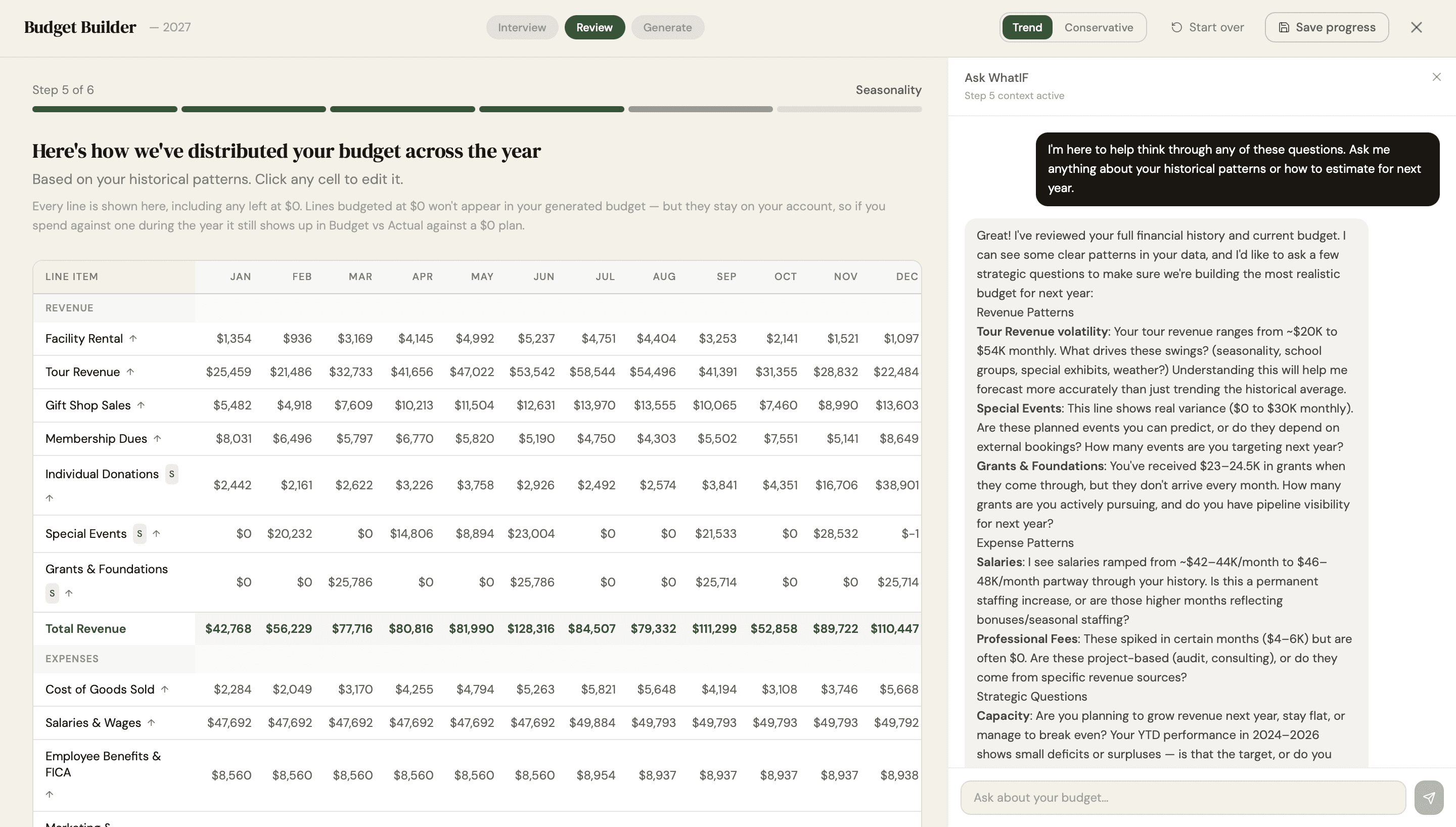
Budget Builder, cropped. Click to expand — the full page runs longer than the screenshot shows.
What it produces
A complete, categorized annual budget where every line starts from a realistic number rather than a guess.
Each figure is built from up to three years of weighted, seasonality-aware history — and each one shows the assumption behind it, so you can defend any line in the budget to anyone who asks.
Who uses this
Executive Directors and finance committees who currently spend hours in meetings manually adjusting last year’s numbers, board treasurers who want budget assumptions they can actually see and defend to the full board, and new nonprofit founders with no financial history yet, who can start from nonprofit category templates instead.
Three ways to edit your budget
Manually
Click into any line item and change it directly.
Spreadsheet view
Work across the full grid, every category against every month, the way you’d work in Excel — but starting from numbers that are already grounded in your real history.
Ask WhatIF
Just describe the change. “We’re hiring a program coordinator at $45,000 in March” triggers the real cascade: salary, payroll tax, and benefits at your organization’s own historical ratio, all updated together automatically — not three separate manual edits.
What makes a nonprofit budget realistic
Start from actuals, not from last year’s budget. Budgeting against a budget compounds every error you made the year before.
Weight recent years more heavily. What happened last year tells you more about next year than what happened three years ago — but pulling from as much history as you have keeps one bad quarter from setting your baseline.
Keep your seasonality. Most nonprofits don’t earn or spend in twelfths. If your December giving is triple your July giving, a flat monthly split will show you a cash crisis every summer that isn’t real.
Show your assumptions. A budget line without a stated assumption can’t be reviewed — it can only be accepted or argued with. Every figure here carries the rate of change used to produce it.
Model the whole cascade. A new hire isn’t one line. It’s salary, payroll tax, and benefits, and forgetting the last two is the most common way a nonprofit budget goes wrong by five figures.
Research-backed estimates, clearly labeled
Budget Builder FAQ
How is this different from just starting with last year's actuals?
Most budgets are built by taking last year's total and adjusting it by feel. Budget Builder instead looks at up to three years of your actual history, weighted so recent trends matter more while a single unusual year doesn't distort the whole picture — and it keeps your real seasonal pattern intact month by month, rather than smoothing everything into an even split. Every line also shows the assumption behind it, so nothing is a guess your finance committee has to take on faith.
Can I see the assumptions behind each budget line, or is it a black box?
Every suggested line item shows its underlying assumption, including the annual rate of change used to project it. Nothing is hidden — you're reviewing the reasoning, not just accepting a number.
How can I edit the budget once it's built?
Three ways: edit any line directly, work in spreadsheet view across the full grid, or just tell Ask WhatIF what's changing in plain language and let it make the edit for you.
What happens when I tell Ask WhatIF about a new hire?
It runs the real cascade — the new salary, the associated payroll tax, and benefits calculated at your organization's own historical ratio — and updates all three simultaneously. You can undo any change if it's not what you meant.
Can Ask WhatIF help me estimate things outside our own data, like a competitive salary for a new role?
Yes — it can research and estimate things like local salary benchmarks. Anything outside your organization's own financial history is always clearly labeled as a research-based estimate, never presented as fact.
What if we had one unusually good or bad year in our history?
The weighting is designed for exactly this — older years count less than recent ones, so a single anomaly doesn't get treated the same as a sustained trend. You can also review and override any suggested line before it becomes your final budget.
We're a brand-new nonprofit with no financial history. Can we still use this?
Yes — Budget Builder includes a start-from-scratch path with nonprofit category templates for organizations without historical data yet.
Can we import a budget we already built in Excel?
Yes, existing budgets can be imported and continued in Budget Builder.
Does the budget update automatically as we spend?
Yes — once connected to your financial data, actuals track against your budget automatically.
Can multiple people work on the budget together?
Yes, with multi-user access on Core and above, your team can collaborate on the same budget.
When should we start building next year's budget?
Most nonprofits start three to four months before their fiscal year ends, so there's time for finance committee review and board approval. With your history already loaded, the first draft takes minutes rather than a weekend.
Related features
14 days free. No credit card.

Financial intelligence for nonprofits
© 2026 WhatIF Machine. All rights reserved.